Sunday, December 27, 2009

Managing Backup: Three Software Solutions Compared

Backup has always been a topic that most people find tedious and boring. It takes time to consider and set up, then it typically works in the background, sucking up system resources while delivering no tangible benefits—until the day your hard drive suddenly crashes. What then? “Where was the last backup again? When did I run the last backup?” Clearly, you want to avoid these questions and have an emergency plan in place. We recently reviewed a storage product that finally makes total system and file backup a piece of cake. We decided to look for additional options and compared Rebit, True Image by Acronis, and the Windows 7 integrated backup feature using a portable hard drive.
Zoom
Backup Options
The first item users typically consider is the backup target device. While the term “backup” is still somewhat associated with tape and other complicated devices, backup isn’t married to any given storage product. Tape drives were the primary backup targets in the ‘80s and ‘90s. Such devices are still in use, but mainly in enterprise environments. Consumers typically use optical drives, hard drives, or network targets for backup, with the significant drops in cost per gigabyte putting hard drives in the lead.
Few would argue that tape backup is the worst choice for consumers today. You need proprietary tapes and a compatible drive, as well as suitable backup software. This means that you have to restore a working backup/restore host system before you can access your data. Recordable DVD or Blu-ray media are well-suited for backup, as write speeds are fast enough, media costs run from cheap (DVD) to still acceptable (BD-R), and you get automatic versioning because write-once discs can’t be modified after write completion.
Hard Drives With USB Are the Winners
However, the hard drive is now most peoples' favorite backup choice, as it is easiest to handle and cost has come down to almost ridiculously low levels. In addition, a USB 2.0 external hard drive is probably the most versatile and universal storage/backup device, since every PC and notebook—running Mac OS and Windows alike—speaks USB.
Keep in mind that hard drives will fail eventually, so it’s imperative either to use several drives for backup or to use redundant storage devices to be on the safe side. Having said this, we can move on and look at a few options suitable for today’s consumer backup. We grabbed a portable drive from Hitachi, the SimpleTouch 500GB, and three different backup solutions: Acronis True Image, which has come a long way from imaging to total system management, the Rebit solution, and Windows 7’s integrated backup. Windows Backup has evolved substantially and may represent a viable free alternative for many users.

Read more...

Hardware Information and System Requirements Tables

Learning About Your Hardware with Windows

If your computer is already running Windows 9x, you can use the following steps to get additional configuration information:

Figure 2-1. Windows 9x System Properties
  • In Windows, click on the My Computer icon using the secondary (normally the right) mouse button. A pop-up menu should appear.
  • Select Properties. The System Properties window should appear. Note the information listed under Computer — in particular the amount of RAM listed.
  • Click on the Device Manager tab. You will then see a graphical representation of your computer's hardware configuration. Make sure the View devices by type radio button is selected.
At this point, you can either double-click on the icons or single-click on the plus sign + to look at each entry in more detail. Look under the following icons for more information:

Figure 2-2. Windows 9x System Properties
  • Disk drives — the type (IDE or SCSI) of hard drive will be found here. (IDE drives will normally include the word "IDE," while SCSI drives will not.)
  • Hard disk controllers — information about your hard drive controller.
  • CDROM — information about any CD-ROM drives connected to your computer.
    Note Note
      In some cases, there may be no CD-ROM icon, yet your computer has a functioning CD-ROM drive. This is normal, depending on how Windows was originally installed. In this case, you may be able to learn additional information by looking at the CD-ROM driver loaded in your computer's config.sys file.
  • Mouse — the type of mouse present on your computer.
  • Display adapters — if you are interested in running the X Window System, you should write down the information you find here.
  • Sound, video and game controllers — if your computer has sound capabilities, you will find more information about them here.
  • Network adapters — information on your computer's network card (if you have one).
  • SCSI controllers — if your computer uses SCSI peripherals, you will find additional information on the SCSI controller here.
This method is not a complete substitute for opening your computer's case and physically examining each component. However, in many cases it can provide sufficient information to continue with the installation.
Note Note
  This information can also be printed by clicking on the Print button. A second window will appear, allowing you to choose the printer, as well as the type of report. The All Devices and System Summary report type is the most complete.
If your computer is already running Windows 2000, you can use the following steps to get additional configuration information:

Figure 2-3. Windows 2000 System Properties
  • In Windows, click on the My Computer icon using the secondary (normally the right) mouse button. A pop-up menu should appear.
  • Select Properties. The System Properties window should appear. Note the information listed under Computer — in particular the amount of RAM listed.
  • Click on the Hardware tab. You will then see your computer's hardware configuration options.

    Figure 2-4. Windows 2000 System Properties — Hardware
  • Click on the Device Manager button. You will then see a graphical representation of your computer's hardware configuration. Make sure the View devices by type radio button is selected.
At this point, you can either double-click on the icons or single-click on the plus sign + to look at each entry in more detail. Look under the following icons for more information:

Figure 2-5. Windows 2000 System Properties
  • Disk drives — the type (IDE or SCSI) of hard drive will be found here. (IDE drives will normally include the word "IDE," while SCSI drives will not.)
  • Hard disk controllers — information about your hard drive controller.
  • CDROM — information about any CD-ROM drives connected to your computer.
  • Mouse — the type of mouse present on your computer.
  • Display adapters — if you are interested in running the X Window System, you should write down the information you find here.
  • Sound, video and game controllers — if your computer has sound capabilities, you will find more information about them here.
  • Network adapters — information on your computer's network card (if you have one).
  • SCSI controllers — if your computer uses SCSI peripherals, you will find additional information on the SCSI controller here.
This method is not a complete substitute for opening your computer's case and physically examining each component. However, in many cases it can provide sufficient information to continue with the installation.

Read more...

Thursday, December 17, 2009

Intel Core i7 920 and 965 review


Aaah yes, my dear apprentices ... the force is strong today. Hey everybody and welcome to another Guru3D.com review. Intel’s code-named Nehalem processors have been discussed for years now, it's been pending for a long time and Intel's' marketing machine has been spinning for for a while. Today is the day that Intel is lifting the embargo on these consumer desktop processors that you guys all have known to learn as the "Nehalem" processors. The processors will become available this month, and they should be fast, they should be flexible and also, reasonably priced. What's not to like, eh?

Intel Core i7 review Guru3D.com 2008

So today Intel launches these Nehalem based puppies on the new name Core i7 as in their 7th architectural generation. A name that will catch on quickly and you'll get used to it just as quickly as well. No less then three processors are announced today and Guru3D.com will take a look at two of them. We'll do more though, later this week a couple of x58 motherboard reviews but today we'll also post an extensive Multi-GPU article to see what kind of effect Core i7 processors have on the hottest gaming gear.
But surely we start off with the processors themselves.
Nehalem (familily) processors code-named Bloomfield (Core i7) have four physical processor cores and a triple-channel DDR3 memory controller.
A new processor deserves a new motherboard, so a new chipset is announced today as well; the x58 chipset. We'll cover that mainboard in several other articles this week as well, but we really wanted a review dedicated to the new architecture first.
Speaking of architecture, what we'll do today is to have a deeper look inside the Core i7 processor, the technology, the architecture, a nice little photo-shoot and obviously a decent benchmark session to see where this product establishes itself performance wise. All in all we got a lot to cover, so hover onward to the next page where I'll show you what specifically is being launched today.

Read more...

Intel Core i7 Mobile CPU (Clarksfield) Review

For quite some time now, Intel has been the undisputed leader when it comes to laptop CPU performance. This advantage comes from the fact that Intel has successfully scaled its desktop processor technology for use in the mobile platform. That trend continues with the latest mobile processor platform being unleashed today from Intel: the "Clarksfield"-based Core i7 Mobile processor family and the new PM55 Express Chipset.

This marks the first time that the "Nehalem" Core i7 microarchitecture has been ported over to the mobile side. The fact that the mobile version of Nehalem makes its debut only two weeks following the launch of Intel's Core i5 ("Lynnfield") mainstream desktop CPU and P55 Express chipset is no coincidence. As it turns out, the Core i7 Mobile processor die is identical to the desktop version, but uses mobile packaging--as far as the microarchitecture is concerned, Clarksfield and Lynnfield are essentially the same thing. The lower power demands of Lynnfield (as opposed to the original Nehalem architecture) are in large part what enable it to also be used in notebooks.

What this means is that Core i7 Mobile-based notebooks will see a number of the same benefits that Core i7 desktops already have, such as integrating the memory controller into the processor die, using a three-level cache hierarchy, utilizing Hyper-Threading technology, and taking advantage of Intel Turbo Boost Technology. What Lynnfield/Clarksfield adds to the equation is on-die PCI Express connectivity, getting rid of the Northbridge chip, and improving the Intel Turbo Boost Technology (from the original Nehalem architecture). Additionally, whereas only the previous Intel Core 2 mobile ("Penryn") microarchitecture had primarily dual-core offerings, all of the Core i7 Mobile solutions are quad cores. The three Penryn-based quad-core mobile processors (the 2.53GHz Core 2 Extreme QX9300, 2.26GHz Core 2 Quad Mobile Q9100, and 2.0GHz Core 2 Quad Mobile Q9000) are made from two dual-core chips merged together in a single CPU package, while Clarksfield uses a single-chip (monolithic) design.

Read more...

Tuesday, December 15, 2009

Hitachi - 2TB Ultrastar A7K2000 review


Hitachi has waded into the 2TB (two terabyte or roughly 2,000GB) hard drive market with not one but two models of internal 3.5-inch SATA 3Gb/sec drives.
On the desktop side of things we have the Deskstar 7K2000 while the server brigade may prefer to look at the Ultrastar A7K2000 reviewed here. Both models use five platters and ten heads to achieve the 2TB capacity which is a true capacity of 1,863GB once the drive has been formatted. There is 32MB of cache and as you would expect the drives have a 7,200rpm spin speed.
The interface is SATA 3Gb/sec (a.k.a. SATA II) which puts the Deskstar and Ultrastar in the mainstream but it also points to something of a problem for Hitachi as these new drives don't have a technical edge over the competition. The 2TB WD Caviar Black and Seagate Barracuda XT drives use four platters rather than the five used by Hitachi. This reduces the cost of components - which is handy - but more importantly it increases the areal density as the data has to be packed more tightly. This means that the read/write heads have less distance to travel from one data block to the next.

Increasing areal density invariably boosts performance and there's another benefit as reducing the number of platters also decreases the levels of noise and heat that are produced by the drive.
Added to that the 2TB Seagate Barracuda XT supports the new SATA 6Gb/secs (SATA III) interface so it looks like the Hitachi drives are up against stiff competition, and so it proved when we strapped the 2TB Ultrastar to our Core i7 test system.
Running the HD Tach 3 benchmark test shows the Ultrastar has an average read speed that is close to the WD 2TB Caviar Black while the average write speed for the Hitachi is faster than the WD.
A real world test of transferring files within the drive takes 20 percent longer on the Hitachi than it does with the WD. This reflects the number of platters in the two drives and hence the areal density so it doesn't come as a surprise.
The industry standard Iometer test shows the Hitachi drive is ten percent slower in Read IOPS than the WD and five percent faster in Write IOPS so the net result is that the Hitachi loses out compared to the WD. The Hitachi is noticeably noisier than the WD Caviar Black.
You'll note that we are reviewing the Ultrastar drive rather than the Deskstar and may wonder about the differences between the two models. The Ultrastar has a rating of 1.2 million hours MTBF (Mean Time Between Failures) while the Deskstar is unrated, and Hitachi gives the Ultrastar a five year warranty where the Deskstar gets three years.
The other difference is the price, as the Ultrastar sells for a hefty £243 while the Deskstar is a mere £130. The latter is amazingly cheap for 2TB of reasonably brisk storage, however we have to be crystal clear that we have not reviewed a Deskstar and as a result we are forced to deliver our verdict on the more expensive Ultrastar.

Read more...

Gigabyte - GV N220OC-1GI review


In recent months Nvidia has busily padding out its
In recent months Nvidia has busily padding out its GeForce 200 series of desktop graphics cards. There are three new additions to the product range in the shape of GeForce 210, GeForce GT 220 and GeForce 240 that seem to complete the job, as the prices start at £30 for a GeForce 210 and head up to £400 for a dual-chip GeForce GTX 295.
GeForce GTX 260, 275, 285 and 295 are all based on the humungous GT200 chip with a startling 1.4 billion transistors per chip or 2.8 billion in the dual-chipped GTX 295. These high-end chips have 240 unified shaders or stream processors but we have not yet seen a mid-range or budget chip based on GT200.
You might think that the GeForce GTS 250 is a close relative of the GTX 260 but it actually derives from the G92 chip with a die shrink from 65nm to 55nm, so it is really an update of GeForce GTX 9800+ which in turn was based on GeForce 8800 GTS.

With that information in your back pocket you may wonder about the provenance of the GeForce GT 220 chip that sits at the heart of the Gigabyte GV N220OC-1GI.
GeForce GT 220 sits near the bottom of the Nvidia GeForce product range and some digging reveals that this seemingly new chip is a 40nm die shrink of the G98 chip that we have previously seen in the GeForce 9600 GSO and before that in the 8800 GSO.
Nvidia has given the chip a significant overhaul that starts with the 40nm die shrink which should reduce power consumption and the output of heat. The finned aluminium cooler on the Gigabyte has a translucent plastic housing clipped on the top that accommodates a 80mm fan that is very quiet. The cooler isn't especially tall but that's the impression you get as the card is incredibly short at a mere 170mm.
Other new features in the GT 220 are support for DirectX 10.1, rather than DirectX 10.0, and an HDMI output compliant with v1.3a that supports audio so you don't need a separate cable. The GT 220 card also has a VGA port and a DVI output.
A basic GT 220 has a core speed of 625MHz which is slightly faster than the GeForce 9600 GSO, however this OC Gigabyte is overclocked to 720MHz. Added to that you have 1GB of DDR3 memory running at 1,600MHz so on the face of it things look promising.
The problem is that the 48 shaders don't provide enough graphics power to play the DirectX 10.1 games that the Gigabyte supports. The telling figure is the 3DMark Vantage Overall score of 3,399 marks that we saw on our Core i7 test PC. This is a fearsomely powerful PC and the GPU score is a mere 2,620 marks which is less than half the score you will get from a Radeon HD 5750. We consider that the HD 5750 is marginal on gaming performance.
Those 3DMark scores translate to a frame rate of less than 20fps in Far Cry 2 at Full HD settings and in BattleForge the frame rate drops below 10fps.
That's simply not good enough for gaming but if you look at the combination of features and price you may well consider the Gigabyte has a place in a PC somewhere in your household.

Read more...

Toshiba Satellite L505-S5993 15.6-Inch Laptop Review

With a large 15.6 inch widescreen monitor, large hard drive and plenty of memory, the Toshiba Satellite L505 has a lot of performance in a not-so-portable package. Ideal as a desktop replacement laptop, it offers a full range of features expected from a desktop computer, but in a laptop sized package.
Here’s some of the more important stuff:
  • 15.6 inch monitor
  • 2.1GHz Intel Pentium T4300 dual-core processor
  • 500GB SATA hard drive
  • 4GB memory
  • Graphics card with shared memory
  • DVD writer
  • 802.11n Wifi and Fast Ethernet
The 15.6 inch monitor is enough for everyday use. My wife owns a similar Toshiba with a screen of the same size. It is not up to the full day workloads of a desktop computer, where a much larger desktop is more comfortable. But for using a single window at a time, this is just enough. At the highest resolution the screen will accommodate a web browser with an instant messaging program or other slim window at the side. A VGA slot if available for attaching a monitor.
The memory is enough, 4GB will serve even the most demanding of users, and is upgradeable to 8GB, although I really don’t see that as being worthwhile because the odds of actually using that much memory are very slim. If you run enough programs to fill up more than 4GB of memory then the speed of the processor will start to come into play as it will have a lot of programs to deal with.
The processor is fast enough, but will chew on power. This is not a super low power CPU and that is reflected somewhat in the short battery life of this laptop. Nothing special, but will perform as expected for the price range.
The 500GB hard drive is more than enough. Up to 100 DVD movies. Just remember to back up your data if you’re going to use that much space. Although hard drives are pretty reliable, they are a common point of failure and are usually not recoverable. With all the information you can store on there, it means there is a lot to lose if the hard drive is damaged. The same information can also be lost due to viruses, so backup regularly. Consider an external hard drive or online storage for backup.
802.11b/g/n wireless is always good. This offers speeds of up to 300Mb/s for the wireless connection to the router if the router supports it. There is a wired Fast Ethernet port too, which is standard and will connect nearly anywhere there is a network available.
Rounding out the rest are three USB ports, built-in speakers, a webcam, and audio input and output.
One little gripe though. I really don’t think it’s necessary to squash the 10-key numeric keypad onto the right. I would opt for a keyboard without the numeric keypad. Although the extra keys are helpful, it is pretty much expected that it won’t be included on laptops because it just makes the space too squashed.
Overall, I would recommend this for home use. It can get lugged around, but does not offer the portability of a netbook. My wife’s version, with different speakers is just great. Windows 7 is a plus too.

Read more...

Toshiba Satellite T115-S1105

Toshiba Satellite T115-S1105

Read more...

Growing Popularity of Forex Trading

Today it is very hard to ignore the fact that forex market is the world's biggest financial market. Over the past few years, it has become the most popular market with trades amounting to more than USD 3 trillion every day. Generally referred as currency trading market, it always involves the combination of two currencies. For example- either you can buy Euro or sell US dollars, or you can buy and sale any other combination of globally accepted currencies.

In recent times, fx trading has gained huge popularity and turned out to be a very profitable money making option. If we look at the present scenario, it can be recognized as one of the most potentially rewarding types of investments available in the global market. Though this form of trading involves great risks but the potential to earn profits are enormous relative to initial capital investments. The major reason of growing recognition is its very low dealing costs, high leverage margin, 24 hours trading a day and high liquidity market. For example, with a $5000 account, you can make about $5000 per month.
Obviously it decidedly depends on the manner that you trade and the strategy you follow but good and experienced traders can double their money every month.

The key positive sign of fx currency trading that can help you consider it as a money-making affair can be its size. Its wide yet easily accessible size prevents almost all attempts by others to influence the market for their own gain. Consequently, when you invest in foreign currency market, you can be certain that the deal you are making has the same opportunity for profit as other investors do throughout the world.

So, if you are looking to get involve in this type of currency trading, it is always better to enjoy trading with the help of a forex broker. A forex broker can be the key person who can guide you to earn more profits from market, as a result it is always better to carefully select a right forex broker for right deal. Apart from all this, the next major fact about this form of currency trading is- in this form of trading there is no centralized location of foreign currency trading. With the help of various online platforms you can trade currency from any parts of the world. With the help of internet connection and active forex trading account you can easily trade in foreign currencies.

Today it can be considered as one of the few trading markets in the world that always provides you with opportunities to trade because of currencies strengthening or weakening. The supply and demand are the factors that determine the price in any market. Now when there are too many buyers and sellers, similar to the current situation in forex market, the price volatility can be much higher, market may be more dynamic and chances to make money can be even more. The price may go up and down more frequently and this dynamic nature helps in making decent money. Consequently, if you are looking to choose Forex as your business, its better you do not get worried about competition but must make sure you develop a proper strategy to earn money and enjoy good success in fx trading.

Read more...

Forex "Naked Trading"

If you hadn’t stayed in Forex trading platform for long and come across a Forex term of "naked trading" it’s for sure that it will be a big astonishment for you and your usual response will be "What"?

Is it possible to earn more by putting off the clothes? No, it’s not so it’s just a Forex term you don’t need to put off your clothes.

This means to the Forex indicators that is you should be well aware about the indicators status. By the term we mean that its always good to take full information about the trade market and analyze the influential factors of the Forex trading.

You must eradicate all the well-painted images of the market as portrayed by the indicators and put before you to attract your attraction and go through the true image of the trading position in the market.

This can be done by examining the price actions of various currencies of the world at the trading platform.

This also indicate that you remove the broker from the trading process and thereby see the crystal image of the trading buying and selling positions of the Forex market not just whatever they intended to show you.

The term "naked trading" means revealing the truth of the indicators that they really want to convey about the Forex trends and market situations.

The brokers and other traders say whatever they find it correct to spread among those who are unaware about the facts of the Forex trading.

This is good to examine and understand the Forex trading indicators by yourself and fetch the conclusions rationally without being influenced by any other opinions.

From the next time whenever you start to trade, take time to consider that whatever Forex examining indicators you are using are revealing the dependable information that will help you out to trade in the market.

It’s just a simple rule to overcome the trading hurdles lying before you while making trading decisions.

The article explains the meaning of the Forex term "naked trading". This means revealing the concealed buying and selling options of the market by examining the trading indicators.

Read more...

The Forex Market and Understanding Foreign Exchange Rates

Unlike the stock exchange, the Forex Market (foreign exchange market) is a relatively new player to the investment world. Today's current Forex market model started in the early 1970's, and today it represents the biggest financial market around, even surpassing the stock market. With trading surpassing $2 trillion dollars per day, the Forex market attracts more and more investors all the time. Before an investor starts trading on the Forex market, he should grasp the fundamentals of how exchange rates work.

Exchange rates

Basically, the exchange rate represents the rate of exchange between two currencies. Most currencies are traded, or paired up against the dollar. The five most common currencies traded on the market are the dollar (USD), euro (EUR), the yen (JPY), the British pound (GBP), and the Swiss franc (CHF). Some other currencies that are traded are the Australian dollar, the Canadian dollar, and the Hong Kong dollar.

In the exchange rate or ratio, the numerator represents the quote currency and the denominator the base currency, which always equals one.

Let's say that an investor wants to exchange euros for dollars. In this case, the euro currency is the quote currency, or how much currency you have to exchange. The base currency is the dollar. The investor researches the current exchange rate (euros converted into dollars) either on the Internet, through the bank, broker, etc., and then multiplies that amount by the number of euros to exchange. Let's say that the exchange rate is 1.57959. That means that 1.57959 euros must be paid to receive one dollar. If he has 1000 euros to exchange, then he can receive $1,579.59 (1000 x 1.57959).

On the flip side, the exchange rate can also tell the investor how much he'll receive if he converts dollars back into euros. If he has $1000, he can either divide that amount by the same euro to dollar exchange rate ($1000/1.57959 = 633.07 euros), or look up the conversation rate for dollars to euros on the Internet, etc. (i.e. .633072) and multiply it by the amount of dollars to exchange ($1000 x .633072 = 633.07 euros).

Once the exchange rate concept is understood, the investor can feel more confident in investing in the Forex market.

Read more...

Thursday, December 10, 2009

FIC K8MC51G NVIDIA C51G Socket 754 mATX Motherboard w/Athlon 64 3200+ 2.2GHz CPU, Heat Sink & Fan

The FIC K8MC51G motherboard features the NVIDIA C51G chipset and supports up to 2 GB of DDR 300 or 400 MHz SDRAM. It comes with an integrated NVIDIA video controller and integrated NVIDIA ALC655 5.1-channel audio codec, so you know your multimedia applications will be all set with basic support!

There's also an integrated fast Ethernet controller for surfing the Internet and connecting to wired networks. Install a video card in the PCI Express x 16 slot, or add a modem card or a wireless card with one PCI Express x1 slot and two PCI slots!

Add on your hard drive, optical drive and other crucial components via two SATA/300 connectors, two IDE connectors, and a floppy connector. You'll have a total of eight USB 2.0 connectors (four rear, four internal), along with PS/2, VGA, serial, parallel and audio ports for hooking your system up to external peripherals!

A heat sink and fan is included to keep your CPU cool! Simply install into an ATX case with a power supply, connect the peripherals and add the operating system! Order today!

WARNING: The solder used in this product contains lead, a chemical known to the State of California to cause birth defects and other reproductive harm. Please wash hands after handling internal components and circuit boards and avoid inhalation of fumes if heating the solder.

Features/Specifications:
  • FIC K8MC51G Socket 754 Motherboard  & Athlon 64 3200+ CPU Combo

  • General Features:
  • AMD Athlon 64 3200+ 2.2 GHz CPU installed
  • Includes heat sink and fan
  • NVIDIA C51G Northbridge/ NVIDIA MCP51G Southbridge chipset
  • Socket 754
  • mATX form factor
  • Supports up to 2 GB DDR 333/400 MHz SDRAM
  • Integrated video controller embedded in NVIDIA C51G
  • Integrated NVIDIA ALC655 5.1-channel audio codec
  • Integrated Broadcom AC131 10/100 Mbps Fast Ethernet controller
  • Two (2) SATA/300 ports
  • Two (2) UDMA/100/133 IDE controllers 
  • One (1) Floppy connector
  • 24-pin ATX power connector

  • Expansion Slots:
  • One (1) PCI Express x 16 slot
  • One (1) PCI Express x 1 slot
  • Two (2) PCI slots
  • Two (2) 184-pin DDR DIMM sockets

  • I/O Ports:
  • Two (2) PS/2
  • One (1) 9-pin Serial
  • One (1) 15-pin VGA
  • One (1) 25-pin Parallel
  • Eight (8) USB 2.0 (four rear and four via internal header)
  • One (1) RJ-45 Ethernet
  • One (1) Microphone in
  • One (1) Line-in audio
  • One (1) Line-out audio

  • Supported Processors:
  • AMD Sempron/Athlon 64 processors
  • FSB up to 1 GHz

  • BIOS Features:
  • ACPI, APM, DMI, SMBIOS, PnP, USB, PC99, PC2001, Y2K compliant

  • Regulatory Approvals:
  • CE
  • BSMI

  • AMD Athlon 64 3200+ CPU Features:
  • AMD Athlon 64 3200+ CPU
  • 2200 MHz frequency
  • 1600 HT speed
  • 512 KB L2 Cache
  • 32/64 bit operating mode
  • Socket 754

  • Heat Sink and Fan Features:
  • Aluminum Heat Sink
  • 3-inch fan
  • 3-pin power connector
Package Includes:
  • FIC K8MC51G NVIDIA C51G Socket 754 mATX Motherboard
  • AMD Athlon 64 3200+ 2.2 GHz CPU (pre-installed)
  • Heat sink and fan with thermal grease compound (not installed)
Additional Information:

  • Notes:
  • Motherboard model: K8MC51G
  • I/O shield is not included.
  • CPU is refurbished and the rest are new.

  • Product Requirements:
  • ATX case
  • ATX power supply
  • Supported RAM
  • SATA, IDE, floppy cables
  • The rest of the system

Read more...

Online Comparison Shopping Made Even Easier

Jane is a value conscious shopper. She is always looking to compare prices before buying any product. One day, she walks into a local retailer pricing out digital cameras. She writes down several camera model numbers so she can go online later that evening to see if she can find it cheaper elsewhere. Later that evening, Jane spends two or three hours surfing the Internet before she finds the camera she likes at the price she is willing to pay.
Sound familiar?
Imagine if Jane could just call a phone number, punch in the UPC code of the camera, and wait a few seconds while a database searches the Internet to compare prices for her. Imagine if she could then buy the camera right there on the spot. Sounds like a future technological advancement, doesn't it? Not quite the future; it's already here.
Online shopping has made it easier for consumers to get what they want, whenever they want it at the prices they want. Every major brick and mortar retailer now has a presence online not including the smaller, more specialized retailers located around the world. However, the vast array of online retailers can make it difficult for consumers to find the products they are looking for at the most affordable price. In addition, consumers do not have time to spend hours in front of their computers scouring across Internet looking for products. Consumers are demanding a better, more efficient and less cumbersome way to compare and buy products online. Frucall has stepped up to the challenge and has introduced a new way to compare prices online.
Frucall is a new, innovative service that enables consumers to compare products online using their mobile phones. This alleviates the valuable time spent trying to accomplish the same thing in front of a computer. In today's increasingly connected world, everyone has a mobile phone with them at all times which makes the Frucall service so attractive.
Here is how Frucall works. Customers first sign up online for their free account. In their profile, they store their mobile phone number and optional credit card information. Then, when they are shopping at the mall, they simply call the toll free phone number and type in the UPC code of the product of interest. In a few seconds, the Frucall service will read the results to the customer. It's that easy.
At the present time Frucall's service only queries Amazon.com because that's currently the only service that allows Web Services queries. However, that will change as additional online retailers allow Web Services queries are added.
The ability to do voice-based comparison shopping through a mobile phone is a captivating concept whose time has definitely come. In a world where so many of our daily activities are performed with a mobile phone, the Frucall service takes its capabilities one step further. If you are a busy consumer that values convenience and services that are helpful in saving you time, then Frucall is exactly what you need. You have nothing to lose and everything to gain from using the Frucall service.

Read more...

PC Motherboard Technology

As a kid, perhaps you enjoyed putting together model cars or airplanes. Some people grow up and still like the challenge of buying plastic airplane parts and trying to create something that resembles the picture on the front of the box. Some people move on to woodworking, risking life and limb in an attempt to turn harmless pieces of wood into furniture. Others end up covered in grease while restoring an old car, spending more money than they would on a shiny new model. It's the urge to create, and the instinct has been around since before our ancestors did cave paintings in France. Now some of us have a new hobby, buying a box of computer parts and bringing to life one of the most fascinating creations ever envisioned.
A Fast Trip Through the Motherboard Landscape
These days, it's gotten much easier for a person to put together a new PC from a set of components, thanks to improvements in technology and the availability of helpful guides on the Internet. Bringing a new computer to life can still provide that same thrill and sense of accomplishment, since building your own PC is really an opportunity to do system design engineering. Choosing the right components and carefully configuring the system can create a perfectly balanced (and cost-effective) computer architecture.
While the latest, sexy CPU's receive all the attention, it's really the motherboard that brings it all together to turn a processor into a personal computer. Let's take a look at the way desktop motherboard and processor technologies have evolved these last few years, focusing on the system issues facing the designers of screaming-fast CPU's. We'll take a processor-neutral approach and try to give the reader some tools for making an objective evaluation of systems based on Cyrix, Intel, or AMD processors. We'll explain the various components on today's motherboards, including some new initiatives that have dramatically simplified the motherboard upgrade ritual.
It would take an entire article to properly cover the (somewhat controversial) overclocking methodology, but we'll touch briefly on this topic in the context of what we learned about motherboard parameters. We'll then test-drive this new system knowledge by making brief case studies of some motherboards that accommodate the newest processors. These motherboards were selected to highlight various architectural differences, and do not represent our endorsement of particular products. In our last section, we'll talk about what the future holds for motherboard architectures.
Before we plunge into the intricacies of the motherboard itself, first we need to take a little time to understand general computer architecture. That will help us later as we describe some of the new motherboard technologies.

Read more...

Computerh Motherboard


Read more...

Intel Cancels Larrabee Retail Products, Larrabee Project Lives On

We just got off the phone with Nick Knupffer of Intel, who confirmed something that has long been speculated upon: the fate of Larrabee. As of today, the first Larrabee chip’s retail release has been canceled. This means that Intel will not be releasing a Larrabee video card or a Larrabee HPC/GPGPU compute part.

The Larrabee project itself has not been canceled however, and Intel is still hard at work developing their first entirely in-house discrete GPU. The first Larrabee chip (which for lack of an official name, we’re going to be calling Larrabee Prime) will be used for the R&D of future Larrabee chips in the form of development kits for internal and external use.

The big question of course is “why?” Officially, the reason why Larrabee Prime was scrubbed was that both the hardware and the software were behind schedule. Intel has left the finer details up to speculation in true Intel fashion, but it has been widely rumored in the last few months that Larrabee Prime has not been performing as well as Intel had been expecting it to, which is consistent with the chip being behind schedule.

Bear in mind that Larrabee Prime’s launch was originally scheduled to be in the 2009-2010 timeframe, so Intel has already missed the first year of their launch window. Even with TSMC’s 40nm problems, Intel would have been launching after NVIDIA’s Fermi and AMD’s Cypress, if not after Cypress’ 2010 successor too. If the chip was underperforming, then the time element would only make things worse for Intel, as they would be setting up Larrabee Prime against successively more powerful products from NVIDIA and AMD.

The software side leaves us a bit more curious, as Intel normally has a strong track record here. Their x86 compiler technology is second to none, and as Larrabee Prime is x86 based, this would have left them in a good starting position for software development. What we’re left wondering is whether the software setback was for overall HPC/GPGPU use, or if it was for graphics. Certainly the harder part of Larrabee Prime’s software development would be the need to write graphics drivers from scratch that were capable of harnessing the chip as a video card, taking in to consideration the need to support older APIs such as DX9 that make implicit assumptions about the layout of the hardware. Could it be that Intel couldn’t get Larrabee Prime working as a video card? That’s going to be a big question that’s going to hang over Intel’s heads right up to the day that they finally launch a Larrabee video card.

Ultimately when we took our first look at Larrabee Prime’s architecture, there were 3 things that we believed could go wrong: manufacturing/yield problems, performance problems, and driver problems. Based on what Intel has said, we can’t write off any of those scenarios. Larrabee Prime is certainly suffering from something that can be classified as driver problems, and it may very well be suffering from both manufacturing and performance problems too.

To Intel’s credit, even if Larrabee Prime will never see the light of day as a retail product, it has been turning in some impressive numbers at trade shows. At SC09 last month, Intel demonstrated Larrabee Prime running the SGEMM HPC benchmark at 1 TeraFLOP, a notable accomplishment as the actual performance of any GPU is usually a fraction of its theoretical performance. 1TF is close to the theoretical performance of NVIDIA’s GT200 and AMD’s RV770 chips, so Larrabee was no slouch. But then again its competition would not be GT220 and RV770, it’s Fermi and Cypress.

Next, this brings us to the future of Larrabee. Larrabee Prime may be canceled, but the Larrabee project is not. As Intel puts it, Larrabee is a “complex multi-year project” and development will be continuing. Intel still wants a piece of the HPC/GPGPU pie (least NVIDIA and AMD get it all to themselves) and they still want in to the video card space given the collision between those markets. For Intel, their plans have just been delayed.


The Larrabee architecture lives on

For the immediate future, as we mentioned earlier Larrabee Prime is still going to be used by Intel for R&D purposes, as a software development platform. This is a very good use of the hardware (however troubled it may be) as it allows Intel to bootstrap the software side of Larrabee so that developers can get started programming for real hardware while Intel works on the next iteration of Larrabee. Much like how NVIDIA and AMD sample their video cards months ahead of time to game developers, we expect that Larrabee Prime SDKs would be limited to Intel’s closest software partners, so don’t expect to see much if anything leak about Larrabee Prime once chips start leaving Intel’s hands, or to see extensive software development initially. Widespread Larrabee software development will still not start until Intel ships the next iteration of Larrabee, if this is the case.

We should know more about the Larrabee situation next year, as Intel is already planning on an announcement at some point in 2010. Our best guess is that Intel will announce the next Larrabee chip at that time, with a product release in 2011 or 2012. Much of this will depend on what the hardware problem was and what process node Intel wants to use. If Intel just needs the ability to pack more cores on to a Larrabee chip then 2011 is a reasonable target, otherwise if there’s a more fundamental issue then 2012 is more likely. This lines up with the process nodes for those years: if they go for 2011 they hit the 2nd year of their 32nm process, otherwise if they launched in 2012 they would be able to launch it as one of the first products on the 22nm process.

For that matter, Since the Larrabee project was not killed, it’s a safe assumption that any future Larrabee chips are going to be based on the same architectural design. The vibe from Intel is that the problem is Larrabee Prime and not the Larrabee architecture itself. The idea of an x86 many-cores GPU is still alive and well.


Finally, there’s the matter of Intel’s competition. For AMD and NVIDIA, this is just about the best possible announcement they could hope for. On the video card front it means they won’t be facing any new competitors through 2010 and most of 2011. That doesn’t mean that Intel isn’t going to be a challenge for them – Intel is still launching Carkdale and Arrandale with on-chip GPUs next year – but they won’t be facing competition at the high-end too. For NVIDIA in particular, this means that Fermi has a clear shot at the HPC/GPGPU space without competition from Intel, which is exactly the kind of break NVIDIA needed since Fermi is running late.

Read more...

Intel's Larrabee Hits 1TFlop of Computing Speed

However, the company made up for that -- with interest -- at last month's SC09 supercomputing show.

The conference focuses on all things relating to high-performance computing, a market that GPU vendors have increasingly wanted a piece of. Nvidia Corp. and AMD's ATI division were both on hand at SC09 to show off their products tuned for HPC, as was Intel. However, instead of just discussing the Nehalem generation of CPUs, CTO Justin Rattner also showed off Intel's significant development progress on Larrabee.

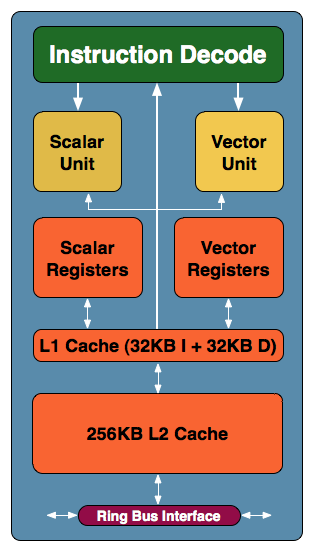
Intel has been coy about the exact specs of Larrabee. It has not revealed how many cores it will have, nor its clock speed or power draw. What is known is that it's a multicore design that uses older Pentium cores, updated with 64-bit extensions and SIMD extensions, plus a 1,024-bit high-speed ring bus to link all of the cores.

While Larrabee's IDF showing offered little to tantalize the audience -- a demo featured an aging 3D graphics game with barely any action taking place on-screen -- Rattner's SC09 keynote aimed to amaze.

During his presentation, he held up a Larrabee graphics card, which was about as large as modern-day cards, and then ran an HPC demo.

Using an SGEMM single-precision math performance test and half the cores on the card, Larrabee racked up 417 gigaflops (GFLOPS) of performance. With all the cores turned on, it hit 825 GFLOPS, which would indicate the 1:1 scaling that Intel has said it's aiming to provide.

With a little overclocking, Rattner then got it to hit the 1 teraflop (TFLOP) barrier.

By way of comparison, the Intel quad-core QX9775 Core 2 Quad, the highest-end processor of the pre-Nehalem generation, tops out at 51.2 GFLOPs. The Core i7-975, the top desktop of the Nehalem generation, hits 55.36 in turbo mode and 42.56 in regular mode.

Still, Larrabee has its doubters. To industry analyst Jon Peddie, for instance, Larrabee's performance is good -- but not good enough.

"You've got ATI out with a card [the Radeon HD 5970] that can do five teraflops now. For Intel to come out with a card that does one teraflop next year isn't going to cut it in the high-end space," Peddie, president of Jon Peddie Research, told InternetNews.com.

He qualified that by stating that Intel's new toy does perform well, but adds that it has to compete against some very established players in ATI and Nvidia.

"I think Intel wants to show the progress they've been making, and the part can deliver performance, and one teraflop is a good level of performance. If they price it according to other one-teraflop parts from ATI and Nvidia, then they have a contender," he said.

The question is how much of a contender. "Intel will take market share from Nvidia and ATI. How much remains to be seen," Peddie added. "Intel will get market share just for showing up, but going into the performance market, they will have work to do. They are going into Nvidia's and ATI's camp where there is tremendous brand loyalty."

Still, he said he feels Intel is taking the right approach -- even if it's likely to prove tough going.

"They have a program plan, and as far as I know, they are executing close to plan. They've done the seriously hard work in terms of getting developer community onboard. The hard work they had to do was all the software tools," he added.

Read more...

Intel's New Advanced Graphics Port

Intel has been promising their Advanced Graphic Port for a year. Now with the release of the new Pentium-II LX chipset, it is finally here. AGP is a new type of bus design. On a computer's motherboard, there are two types of expansion slots, ISA and PCI. ISA is an older form of expansion slot, and most expansion cards today use the newer PCI bus. With the Advanced Graphics Port, Intel has designed an expansion slot just for video cards.

Until AGP, most video cards used the PCI bus, with a few older video cards using the ISA bus. The PCI bus ran at 33mhz, half of the system speed (66mhz). Running at 33mhz, the PCI bus could have a maximum transfer rate of 132mb/s. The Advanced Graphic Port runs at 66mhz, giving an increased transfer rate of 266mb/s (referred to as x1). In addition to x1 transfer speeds, AGP uses new technology with allows it to double its bandwidth by transferring on the rising and falling timings of the 66mhz clock to get 532mb/s (referred to as x2). A further benefit of AGP over the PCI bus is that it is a dedicated bus, unlike PCI with can have other devices taking up its bandwidth. The increased transfer speeds to the main CPU and memory allow for increased speed in graphical operations (mostly 3D operations).

The other main feature of the Advanced Graphics Port is "Direct Memory Execute" (or DIME). It allows for video card to use some of the main memory for texture memory with 3D graphics. Usually video cards have four megabytes of RAM, with a few having eight. DIME allows for 12, 16, or even more memory to be used by allocating some of the main system memory. The increased amount of memory increases the graphical speed during high-resolution 3D scenes. Before AGP, high-resolution 3D scenes were nearly impossible to use with a decent frame rate. There were a few PCI cards that offered up to 32mb of RAM onboard, but they were very expensive.

The easiest way to understand DIME, is to think of it as giving the video card direct access to the main system components. The following image is a good example of this. (Thanks to Diamond Multimedia)

Read more...

Wednesday, December 2, 2009

pc repair

Read more...

computer-hardware-support

Read more...

Computer Hardware PIc

Read more...

Computer Mouse

Read more...

Computer Hardware Images


Read more...

Monday, November 23, 2009

Restored Computer

Hardware is an aspect of your computer that doesn’t require the need to be changed that often, unlike software. So if your hardware shouldn’t need to be changed that often you want to make sure that when you purchase it you are buying a piece of hardware that will last. A lot of people overlook the need and responsibility of PC hardware and instead concentrate primarily on software. Without the correct hardware your PC will fail to function correctly. The term hardware can be fixed to many aspects of your computer, with the main aspect being your motherboard. The motherboard is classed as the heart of your computer; its main purpose is to provide electrical and logical connections. Without a motherboard your computer will not be able to function. Components such as external storage, controllers for video display and sound are attached to the motherboard via edge connectors and cables.

The central processing unit (CPU) is also found on the motherboard and acts as another important piece of computer hardware. The CPU performs most of the calculations which enables a computer to function. The CPU and the motherboard are found within the tower of your computer as is the computer fan, needed to keep your computer at a safe temperature and your power supply, which is obviously needed to ensure your computer has power to function. Along with all of these you will also find your computers sound card and graphics card within your computer tower. Your graphics card, also known as a video display controller, is important to your computer as it is what enables you to get a good resolution and without one you would not be able to watch videos, play games or even clearly see flash images on websites. One last hardware feature of importance that is kept within your computer tower is the computers hard drive. The hard drive is the storage area of your computer system. All your programmes and applications as well as images, music, video and all forms of media that is on your computer are stored within your computers hard drive. All of the previously mentioned hardware is stored in the tower of your computer but there are aspects of computer hardware that are visible on your computer such as removable media in the form of a CD drive, DVD drive, floppy disc and USB ports.

When it comes to buying these pieces of computer hardware most people head straight to the biggest brand store and pay over expensive prices for hardware that you could have got a lot cheaper from another avenue. If you are looking to buy computer hardware there are a number of options open to you rather than just buying new. For example there are computer fairs that are held, which sell all forms of computer hardware at very reasonable prices; if you know what you are looking for you will be able to find a great deal at a computer fair. However if you would prefer buying from a retailer have you considered buying used hardware? Please don’t be put off by the term used what is meant by this is you would be buying new hardware that has been returned by customers and restored by the retailer. Dell is a prime example of a store that frequently sells hardware that has been returned and has been repaired to new standards.

Read more...

Service Provider Venomit

Good quality IT support for any business large or small is the best way to increase efficiency and ultimately reduce overheads within your organisation. Venom IT pride themselves on the ability to tailor unique support packages to ensure that all our clients are working efficiently with the resources they have available.

Computer software is so called to distinguish it from computer hardware, which encompasses the physical interconnections and devices required to store and execute (or run) the software. At the lowest level, software consists of a machine language specific to an individual processor. A machine language consists of groups of binary values signifying processor instructions that change the state of the computer from its preceding state. Software is an ordered sequence of instructions for changing the state of the computer hardware in a particular sequence. Computer software or just software is a general term used to describe the role that computer programs, procedures and documentation play in a computer system.

The term includes:
Application software, such as word processors which perform productive tasks for users.
Firmware, which is software programmed resident to electrically programmable memory devices on board main boards or other types of integrated hardware carriers.
Middleware, which controls and co-ordinates distributed systems.
System software such as operating systems, which interface with hardware to provide the necessary services for application software.
Software testing is a domain dependent of development and programming. Software testing consists of various methods to test and declare a software product fit before it can be launched for use by either an individual or a group.
Testware, which is an umbrella term or container term for all utilities and application software that serve in combination for testing a software package but not necessarily may optionally contribute to operational purposes. As such, testware is not a standing configuration but merely a working environment for application software or subsets thereof.

Venom IT supports is a tailored, proactive service and our aim is to offload the strain and administrative burden of IT issues away from your business. With engineers on hand to assist with day to day problems and monitor your systems for faults and potential issues we are able to prevent issues before they even arise to ensure your business is up and running 100% of the time.

Support Connect
With the growth of remote connectivity we have the ability to connect to a client's PC. This is still being used as a second choice option by many IT support providers. We operate differently. Our Support Connect software is used as a primary support choice within a few mouse clicks you are connected to one of our engineers who are available to assist you.

Read more...

TV and Computer 3D Technology

Everything old is new again. While it first emerged in the 1950s as a passing fad, 3D technology for movies is making a comeback. Yes, you still need to wear special glasses to see it, but that might not be true much longer...and some manufacturers are determined to make the 3D leap from the movies into your living room. Keep reading to find out the state of the art. We’ve all seen the old black and white photographs of young couples, kids, and grownups from the 1950s shielding their faces in horror while witnessing what at the time was considered to be cutting edge technology: 3D movies. Movie goers from this more wholesome time were able to see classics such as the original "House of Wax" in a way that had never been experienced before, which is to say while wearing flimsy paper glasses with red and blue lenses.

The movies were quite dramatic and cheesy and the 3D effects were nowhere near as realistic as they are today, but these early films engaged audiences and began a short-lived trend that is once again gaining popularity. After all, the new go-to horror director, Rob Zombie, is currently in talks to direct a remake of “The Blob,” another 1950s classic, but this time he’ll be doing it in 3D. In the 50s when the popularity of television exploded, the motion picture industry was left reeling and trying to figure out how they could once again lure audiences into theaters. Even at this time, 3D films weren’t a new phenomena; this technology was developed and experimented with during the silent film era, but it never made a big splash. Motion picture executives in the 50s, however, were hoping that 3D films would be appealing enough to entice customers back into theater seats and away from their beloved television sets.

For a short time in America, over 5,000 movie theater were screening 3D movies. They were also being produced and showcased in Britain, Japan, Germany, Hong Kong, and Mexico. Unfortunately for the film industry, the buzz surrounding these realistic-seeming movies eventually died out as viewers began complaining of headaches during screenings, and shooting these movies became too expensive.

Obviously, the use of this technology didn’t entirely disappear. Today’s 3D offerings are like no other in our history; the glasses have gotten cooler as well. 3D movies now show on massive screens at IMAX theaters, and if recent releases by Pixar (“Up”) and Disney (“A Christmas Carol”) are any indication, the technology is experiencing a major comeback. A couple of popular electronics companies are interested in taking this technology even farther by offering 3D devices that consumers can use in the comfort of their own home.

A recent study of individuals who consider themselves “technologically savvy” and interested in new gadgets found that consumers are interested in practical 3D video devices that don’t require the use of glasses. Coincidentally, two such devices were showcased at the 2009 Digital Content Expo held in Tokyo this past October. Though Sony’s device is in very early development and Pioneer’s may not be available in the U.S. for months, both provide a valuable glimpse into what the future of television and 3D technology will look like. Let’s find out more about these offerings from Sony and Pioneer.

Read more...

GA P55 UD3R Intel P55 Motherboard

Fortunately a slightly smaller feature set doesn't affect its overall performance or compatibility. Gigabyte's GA-P55-UD3R motherboard supports all of Intel's socket 1156 Core i5 700-series and Core i7 800-series processors, which so far consists of the Core i5 750, Core i7 860 and Core i7 870, as well as future support for Intel's upcoming 32nm socket 1156 processors as well. Core i7 8xx-series should not be confused with Core i7 9xx-series processors, those are socket 1366 CPUs which are not compatible with this motherboard or any P55 Express platform.

INCLUDES: User's Manual, Driver CD, (4) SATA cables, I/O Shield, IDE cable.
Chipsets: Intel P55 Express
CPU Support: Intel Socket 1156
Memory Type: Dual Channel DDR3-800/1066/1333
Videocard Support: (2) PCI Express x16 2.0
Integrated Graphics: No

One of the biggest changes with the P55 Express chipset is what it doesn't do. While traditionally Intel chipsets have used the northbridge to control memory (including last generation's Intel P45 Express), that job now falls to the Core i5 and Core i7 processors and on-die memory controllers. The shift makes for some big improvements in memory performance, fortunately for the end-user memory compatibility is still pretty familiar. The GA-P55-UD3R will support up to 16GB of dual-channel DDR3 RAM, in speeds of DDR3-800/1066/1333 and even DDR3-2200 under certain overclocked settings.

Another thing you won't find on the Intel P55 Express chipset is an add-on PCI Express 2.0 controller, it's been moved on to the die of socket 1156 Core i5 processors. This on-board controller supplies x16 lanes of PCI Express 2.0 bandwidth to the primary PCI Express x16 slot. Another PCI Express x16 slot is supplied with x4 lanes of bandwidth by the Intel P55 Express chipset, and both of these PCI Express x16 slots can be linked together in Crossfire mode when paired with similar ATI Radeon videocards.

Although some motherboards using Intel's P55 Express chipset will run dual NVIDIA Geforce videocards in SLI mode, the GA-P55-UD3R doesn't have this feature built-in. Not that it matters much any more, NVIDIA's latest videocards never materialized and never will. With Intel's Core i5 processors now handling most of the roles that would have traditionally been the job of the Northbridge, there's no longer any need for a two-chip core logic. Intel has merged the Northbridge and Southbridge into a single entity named the "PCH", P55 Express to you and me, it controls the legacy PCI slots, storage, networking and USB.

In addition to its two PCI Express x16 slots, Gigabyte's GA-P55-UD3R has four legacy PCI slots and a single PCI Express x1 slot (with x1 lanes of bandwidth, naturally). This leaves a fair amount of room available for expansion. The board is well laid out so that even with two double-wide videocards installed, there's room for a pair of legacy expansion cards. Useful if you have an old TV tuner and fancy soundcard.

Intel's creation of the PCH controller for the Intel P55 Express chipset is an evolution of the ICH10R southbridge controller that graced the Intel P45 Express chipset. The PCH storage controller can handle up to six SATA II connection at 3Gb/s in RAID 0, 1, 5 and 10 modes. Gigabyte adds two more controllers into the mix, a JMicron JMB362 controller that powers two eSATA ports that can be run in RAID 0, 1 and JBOD modes, as well as Gigabyte's own SATA controller, which controls two more SATA II 3Gb/s that also do RAID 0, 1 and JBOD, and finally a legacy PATA adapter that can handle up to two IDE devices. Altogether that's 8 internal SATA connections and two eSATA connections, a lot of storage by anyone's definition. Unfortunately, there's no SATA 6G on this particular board.

Around back the I/O panel abounds with connectors; 10 USB 2.0 ports ready to go, a gigabit RJ-45 port, coaxial and optical S/PDIF audio connectors, 8-channel audio stereo jacks and two e-SATA ports for external devices. The Gigabyte GA-P55-UD3R motherboard retails for around $150 CDN ($140 USD, £85 GBP) which puts it right where motherboards based on Intel's P45 Express chipset used to be. When combined with a processor like the $200 Intel Core i5 750, it's pretty easy to build a socket 1156 computer system for under $600.

Read more...

Google announce energy efficient computing

Intel Corp. and Google Inc. recently announced an initiative to promote the development and adoption of more energy-efficient computers, components and power supplies. Twenty-five additional companies and organizations have already signed up for the "Climate Savers Computing Initiative," including computer and component manufacturers, energy companies, electronics retailers, government agencies and environmental organizations.

"Today, the average desktop PC wastes nearly half of its power, and the average server wastes one-third of its power," said Urs Hölzle, Google's senior vice president of operations. "The Climate Savers Computing Initiative is setting a new 90 percent efficiency target for power supplies, which if achieved, will reduce greenhouse gas emissions by 54 million tons per year."

According to Hölzle, this reduction would be equivalent to removing 11 million cars from the road.The initiative has taken the U.S. government's 2007 Energy Star guidelines at its starting point, but plans to eventually surpass them. For example, the guidelines require that all Energy-Star-certified personal computer power supplies be 80 percent efficient, whereas the Climate Savers Computing Initiative aims to hit 90 percent by 2010.

According to Pat Gelsinger, senior vice president of Intel's Digital Enterprise Group, Climate-Savers-certified desktop computers are expected to cost approximately $20 more than uncertified ones at first, and servers are estimated to cost $30 more. But Gelsinger hopes that energy companies can be persuaded to offer rebates until the new, more efficient devices become the industry standard and the price declines.In either case, Gelsinger points out that the energy savings from a Climate Savers device would pay for the higher cost within two years. In addition to developing new products, the initiative includes plans to push the adoption of new energy-efficiency policies, educate consumers and encourage the widespread adoption of new devices.

Read more...

Core 2 Duo E8500, E8400 E8200 Processors

Not so long ago we thought that in early 2008 we will be focusing on comparing the new AMD Phenom processors against the refreshed Intel Penryn manufactured with 45nm technological process. However, these expectations didn’t come true, and both – AMD and Intel – should be blamed for that.

It is true, at this time AMD cannot deliver mass quad-core processors working at competitive frequencies. The currently available Phenom models lose even to previous generation quad-core Intel processors, not to mention the more advanced CPUs. It is quite logical that Intel doesn’t have any significant stimulus to refresh their quad-core processor line-up, because there are simply no worthy competitors to the pretty successful Core 2 Quad on old 65nm cores these days. That is why the launch of new Core 2 Quad processors known as Yorkfield has been postponed for an indefinite period of time, at least until February or March 2008. And although Intel has found an excuse – an alleged problem in the upcoming processors caused by EMI in 1333MHz front side bus when these CPUs are used in hypothetical mainboards with 4-layer PCB design – it doesn’t sound convincing at all.

As for us, we have to state to our disappointment that it doesn’t make sense to compare Phenom against Penryn, because the former is uncompetitive, and the latter is still illusive and remains only an upcoming solution for the time being.

Nevertheless, there are more than enough interesting topics for discussion in the today’s processor market. Although Intel decided to postpone the launch of their quad-core processors on 45nm cores, the Core 2 Duo processor lineup will be refreshed with a few new models. They are going to announce three new processor models with Wolfdale codename within the next few days. They will be Core 2 Duo E8500, E8400 and E8200. These CPUs are based on the revised core manufactured with 45nm process and belong to the same Penryn family as the postponed Yorkfield CPUs. We certainly can’t disregard the arrival of mass Wolfdale processors, which promise to raise the performance bar for Intel’s dual-core solutions to a totally new qualitative level. They feature higher clock speeds, larger L2 cache and a number of other improvements. And the most pleasing thing about them is their cost, set at the same level as that of older Core 2 Duo solutions.

So, in the second half of January 2008 Intel is going to massively update their dual-core processor lineup in $160-$260 price range. This particular event became the main topic of our today’s article that will dwell on the new promising Intel processors and the changes they will bring to the mainstream desktop market.

Read more...

Intel eliminate from microprocessor chips

Intel Corp. has announced plans to stop using lead as a soldering agent in its microprocessors. Lead is a chemical element with widespread industrial use. It is particularly useful as a semiconductor, due to its specific electrical and mechanical properties. The element, however, is a highly potent toxin known to cause blood and nervous system disorders, including mental dysfunction, especially in children.

Intel began phasing out the use of lead in its products in 2002, with the introduction of a tin-silver-copper soldering alloy. This alloy had replaced lead as a soldering agent in nearly all Intel chip sets and processors by 2004, with the exception of 0.02 grams of lead that continued to be used inside each chip.

This lead will now be eliminated in favor of the tin-silver-copper alloy, beginning with the Penryn line of processors. The company plans to have its microprocessors be lead-free by the end of the year, and to phase out lead in its 65-nanometer-process chips in 2008.

The use of toxic metals in electronics manufacture has become a serious health problem worldwide. High rates of obsolescence have contributed to a global "electronic waste" problem, in which vast quantities of electronics have been ending up as garbage, particularly in Third World countries that are paid to dispose of First World waste.

Unregulated disposal of this waste, whether by landfilling, burning or even disassembly for parts, exposes local workers, residents and ecosystems to a heavy toxic payload. Lead in particular is known for its ability to contaminate soil and groundwater.

According to Solving the E-waste Problem, a United-Nations-led alliance between three U.N. agencies, 16 businesses and several government agencies and universities, electronic waste is one of the fastest-growing types of trash in the world, with levels rapidly approaching 40 million metric tons per year.

Read more...

Tuesday, November 17, 2009

Designing a 3D Background Parallax Effect

The parallax effect is an illusion that is created when the viewer is moving and the objects being viewed may seem to move slower in the distance while objects that are closer to the viewer seem to move a lot faster. A practical example would be when one is riding in a car looking out the window on a highway, and then you notice the objects nearest you like a fence moving by quickly while horses in a field move slower and objects beyond them like a hill won't seem to move at all.

The parallax effect is an illusion that is created when the viewer is moving and the objects being viewed may seem to move slower in the distance while objects that are closer to the viewer seem to move a lot faster. A practical example would be when one is riding in a car looking out the window on a highway, and then you notice the objects nearest you like a fence moving by quickly while horses in a field move slower and objects beyond them like a hill won't seem to move at all. There is a difference in the orientation of the objects you see. Web designers have begun using this effect on various websites and it's an interesting graphic illusion that adds a point of interest on your website when resizing the browser window. To create the 3D background with a parallax effect on your website you will need to use Photoshop and CSS codes.

1. Select a theme. Pick the theme and images you want to create a parallax effect with. You'll need at least three layers of images to create the 3D background design with a parallax effect. You can create background image with snowflakes of different shapes and sizes.
2. Prepare the images and layers in Photoshop. When you have your theme and images ready, open your Photoshop program and load the images in different layers. In this example we have a winter theme with snowflakes that will help create the parallax effect. You should have 3 images and each will be in their respective layers. The first layer will contain the background picture. This is the furthest image from the viewer so you'll have the smallest snowflakes on top of a blue background color. The second layer will contain the mid ground image, these will be slightly larger snowflakes. Then the third and last layer will contain the foreground image or the largest picture.
3. Save the layers in the proper format. We will be saving each image in the PNG 24 format. So when you are done tweaking your images and happy with the results, save each image in the PNG 24 format. First save the background image, but before saving, turn off the visible button on the foreground and midground layers on the layers palette. So the only visible image will be the blue background with small snowflakes on top of it. Go to Save for Web and Devices and select Save, make sure it is in the PNG 24 format and name it background.png. Next, select the midground image layer and make it visible by clicking the visibility box next to it. Since we need to make this a transparent layer we need to turn off the background image visibility button and the background color. So the only visible image is the medium sized snowflakes without a background. Save the midground layer the same way you saved the background layer. Name it midground.png. Last we'll save the foreground layer, turn on the foreground layer visibility button and turn off the midground visibility button. So the only image visible is the foreground image or the biggest snowflake image with no background. Follow the same saving process and name it foreground.png.
4. Create the HTML and CSS codes. Go to your index.html file and create div for the foreground and midground images. The div elements will go between your body tags so it will look like this:

Now go to your style.css file and put in the following code in the body tags:

body {

background: url(images/background.png) repeat 5% 5%;

}

#midground {

background: url(images/midground.png) repeat 30% 80%;

position: absolute;

top: 0; left: 0; right: 0; bottom: 0;

z-index: 997;

}

#foreground {

background: url(images/foreground.png) repeat 105% 120%;

position: absolute;

top: 0; left: 0; right: 0; bottom: 0;

z-index: 998;

}

The CSS code will style the midground and foreground images with absolute positioning and repeat percentages. The repeat percentages will control the horizontal and vertical movement speed of each image. You'll notice our foreground percentages are higher than 100%, this means it will move at a rate faster than the browser window's rate when it is resized. You can now test your theme in your browser.

Read more...

Universal Bus Seriel

With the recent release of Windows 98, the Universal Serial Bus (USB) has become a new buzzword in the computer industry. What's so great about USB? Well, the serial bus has been long neglected in the way of upgrades. We've seen faster video cards (2D and the introduction of 3D), faster and larger hard drives, much faster CPUs, new 3D sound card technology, and faster motherboards. It seems that almost every component in the system has been improved with the exception of the serial bus. Aside from the invention of PS/2 a few years ago, absolutely nothing has happened with the buses until USB came along.

The Universal Serial Bus has several benefits over the older serial bus. One is a greatly increased bandwidth. USB has a bandwidth of 12 megabytes per second, which is plenty of bandwidth for any peripheral. At most, an ADSL modem would probably take up to 6 Mb/s of bandwidth, and other small devices won't take up more than a megabyte with the exception of some USB speakers. In addition to the increased bandwidth, USB also supports up to 127 devices. I'm not exactly sure who would use 127 different devices, but it's always nice to have the upgrade possibilities. USB devices can be powered through the Universal Serial Bus as well. Not all USB devices are powered, but it is nice that the possibility is there.

Many new devices coming on to the market will use USB. Some of the devices may be a surprise, whereas USB isn't just limited to the standard fanfare of keyboards and mice. In the coming months you'll see more and more digital cameras (still and video), modems (ADSL, ISDN, and analog), monitors (CRT and LCD), keyboards, mice, speakers, joysticks, and telephones. In fact, some of these products are available today. One of the more interesting USB products is a USB speaker. But don't speakers need to be plugged into a sound card? This is not the case with USB speakers. They have a sound hardware inside and the audio signal is digitally transmitted across the USB bus. It may seem that the future of sound cards is doomed, but USB speakers will probably stay in the business sector at least for the time being because they can't offer the advanced 3D sound and MIDI features that sound cards can.

Of course no new technology is without its drawbacks and USB has a few of its own. One being that for full USB support you'll need Windows 95 OSR 2.1 with the USB patch, OSR 2.5, or Windows 98. A great feature of USB is that it supports up to 127 devices. However, only two USB ports are on the motherboard and in order to use more than two devices, additional USB hubs must be purchased, which can cost $80 or more. (Some USB devices offer pass-thru connectors, but many do not.)

Read more...